Trust this device can this be permanent ?

Is it possible for the option to "trust this device" to be permanent and not rarely appear ?
We would like to always have a one time password !!
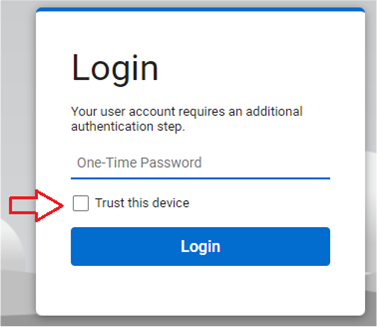
Is it possible for the option to "trust this device" to be permanent and not rarely appear ?
We would like to always have a one time password !!

I set ours to 365 days and it says "Trust this device for 365 days" next to the checkbox, but guess what I still have to do every seven days :(

I set ours to 365 days and it says "Trust this device for 365 days" next to the checkbox, but guess what I still have to do every seven days :(
Did you just change the text or actually change the system options? They are different fields.
Did you just change the text or actually change the system options? They are different fields.
Thank you, here is what I have in Advanced->Web Configuration->Settings

If that's the case then I would for sure open a ticket with CW and report that as a bug to get any movement. That way it will appear on the known issue tracker they have.
I feel as if they only look at the forums when things get slow or only for enhancements that are not bugs.

I believe I have found the root cause, by comparing the behavior across multiple instances.
Support had asked us to change the trust period from 30 days to 29 days, which we tried - it seemed like it worked, for awhile at least.
Then, randomly, one of the instances prompted for MFA (for ALL users that had recently checked "Trust this device") while the other instances did not.
Looking closer, we found that all the machines on that instance showing a shorter connection duration - all of them looked like they had disconnected and reconnected 14 hours and 9 minutes earlier. Checking the audit logs showed 824 machine reconnections within a 3-minute time period overnight.
The other instances did not show this: some machines had been connected for 3+ weeks without interruption, and logging into those instances did not prompt for MFA as it was still less than 30 days.
Looking a bit further, it looks like authentication mechanism (using ASPXAUTH cookies) is reset whenever the web server (IIS) is restarted. There are workarounds, but without those, this is a known issue with ASP and .net (based on research and stack overflow posts where they ALWAYS need to log back in whenever IIS restarts, but I am not a .net/ASP developer).
I have submitted this information to ScreenConnect on our support ticket and we will see what they say. Hopefully, this can confirm the root cause as it seems to be a universal annoyance mentioned on many IT-related forums.
Hopefully, ScreenConnect will either update their documentation regarding the "Trust this device" period to mention this limitation (that any upgrade/server restart will flush all the sessions and "Trust this device" values server-side), or, even better, actually fix this issue (or track it as a bug that they are working to fix).
I received a reply from ScreenConnect support confirming the root cause as the instance restarting/updating (which happens with things like updates to the instance, or underlying servers where they are hosted).
On cloud-hosted instances, updates happen between 2AM and 4AM and are outside of the customer's control (except to push "on demand" ahead of schedule, if available). In our experience these updates typically happen at least monthly, though this varies. The feature also only works on the "internal user" table, and not for other user account (CW Home accounts tied to the instance, and SSO via 3rd party providers for example).
This effectively means that the "Trust this device" period will not reliably work for any particular 30-day period, and so it almost definitely won't honor a setting that is set higher any higher - simply because the session details that this feature relies on get nuked server-side on a regular basis.This is not the only flaw in the mechanism I found and reported, but it nice to at least see it acknowledged.
Hopefully they update their documentation to reflect this, it is out of date in several places (for example, showing the default "Trust this device" period as 30 days when it is actually 7 on new instances).
It would have been nice to get this "by design" response the first time, support first pointed to client-side issues with cookies, then told us to try changing the "Trust this device" period from 30 days to 29 days to see if it made a difference, and then after all of that told us the behavior is "by design."
Here is a snippet of the reply from support, with private details removed.
From: Product Support
Sent: Thursday, August 20, 2026 2:39 PM
To: [Redacted]
Subject: RE: ConnectWise Case #[Redacted] - "Trust This Device" setting not honored [Redacted]
Oliver,
[Redacted]
Aside from that, yes, you are correct. Instance reattachments, restarts, upgrades all will reset those tokens, and it is by design. We actually raised this question to the developers about two months ago and that was the answer: by design.
[Redacted]
Respectfully,
[Redacted]
Software Support Specialist II
ScreenConnect
This is customizable in the web. You could probably set it super high if you wanted.
But it's up to your admin to configure.
Advanced > System Options