Make Access Installer Non-Publicly available

Avatar
  • updated
  • Pending Review

Access Installer link is public on cloud instances.
It seems a better practice would be to put Access Installer downloads behind authenticated sessions.
Any bot or malware could easily scrape many links to get a various amounts of installers from any subdomain.ie: https://YOURCOMPANY.screenconnect.com/Bin/ScreenConnect.ClientSetup.exe
This downloads should only be available if currently signed in to your ScreenConnect account.
This would help bad actors and bots from distributing your Access Installer, which adds machines to your Access account panel.


Avatar
0
josh cross

This is also true for on-prem installers, not just cloud.  We would also like the ability to disable this, or at least require some sort of authentication before being able to download the installer.

Avatar
1
mattonz

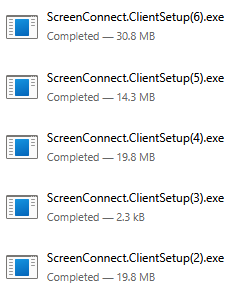
Yeah, you're right if I pick some company names at random that appear to have ScreenConnect I can get installers for all.. (3) and (6) were the same company, so it failed at first but worked second attempt...

Image 1476

+1 on being able to Block this or the installer being removed from here after you've done your Build+, downloaded it for internal distribution or some option to atleast disable it.

Avatar
1
Ian Ball
Quote from mattonz

Has this one been addressed? as I tried some valid company names to see if this was a thing and just get a 3KB .exe file?  The .exes content is: 

Problem loading page

Something went wrong

The page could not be loaded.
Try again in a moment. If the problem continues, contact ScreenConnect support.

Reload Page

I've tried a few just guessing some names and get a 20~30mb exe file that actually installs.
My guess is your companynames are not valid.
I'm surprised these are public links. Connect Client should be protected.

Avatar
1
mattonz

Has this one been addressed? as I tried some valid company names to see if this was a thing and just get a 3KB .exe file?  The .exes content is: 

Problem loading page

Something went wrong

The page could not be loaded.
Try again in a moment. If the problem continues, contact ScreenConnect support.

Reload Page