Session/Access Tab Switching Requires Refresh to Search

When switching from the Sessions tab to the Access tab or vice versa after performing a search, the search will not return results. The current workaround is to clear the query and search again, or refresh the browser window entirely, but having this properly resolved would be very much appreciated. I'd be happy to provide screen capture of this behavior to someone at ScreenConnect.



Thanks for posting.
When you start a search, it is for the session group selected on the page at the time, in this example All Machines by Company on the Access page.
I searched for "four", a session that exists on the support page. As you can see below, if the session is not in the current session group, we identify the session and provide a link to the correct session group and type:
Appreciate the reply!
I follow what you are saying, but it's not that the search is returning empty results, but that the search isn't performed at all.
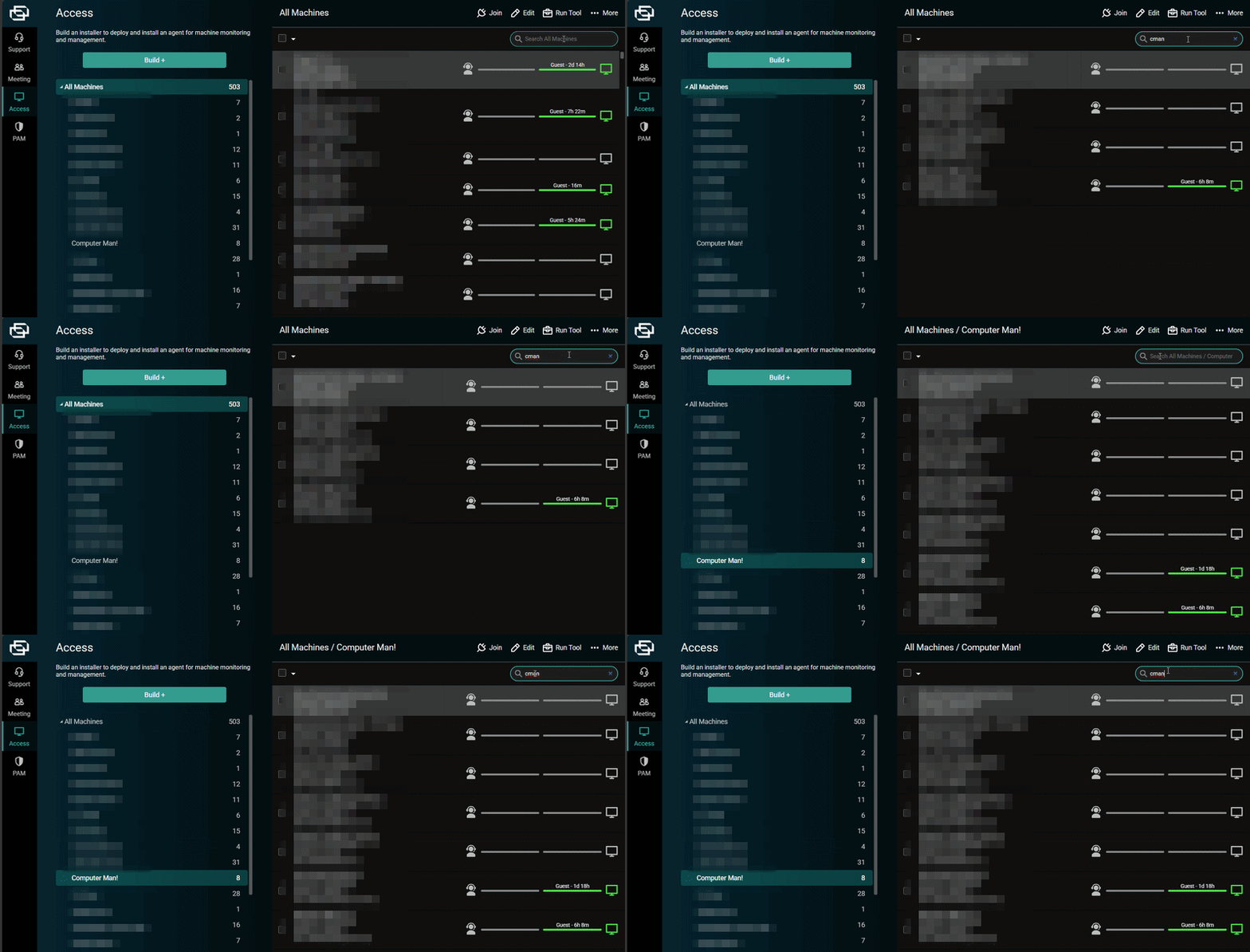
After some more testing, I believe I've narrowed it down to only when I quickly perform the same search again in another session group or when moving from Support to Access tabs. If I type a different query or repeat the same query sluggishly, there is no issue.
In the GIF below, I select one session group (All Machines), type a query, hit enter, and see results. I then immediately switch to another session group (Computer Man!), type the same query, hit enter, and nothing happens at all.
I realize I'm probably one of only a handful of people running into this due to the narrowness of the conditions in which it occurs. I can work around this by typing my repeated query more slowly.
Thanks!